 Chat with us

Call us now :07971671080
 Send Inquiry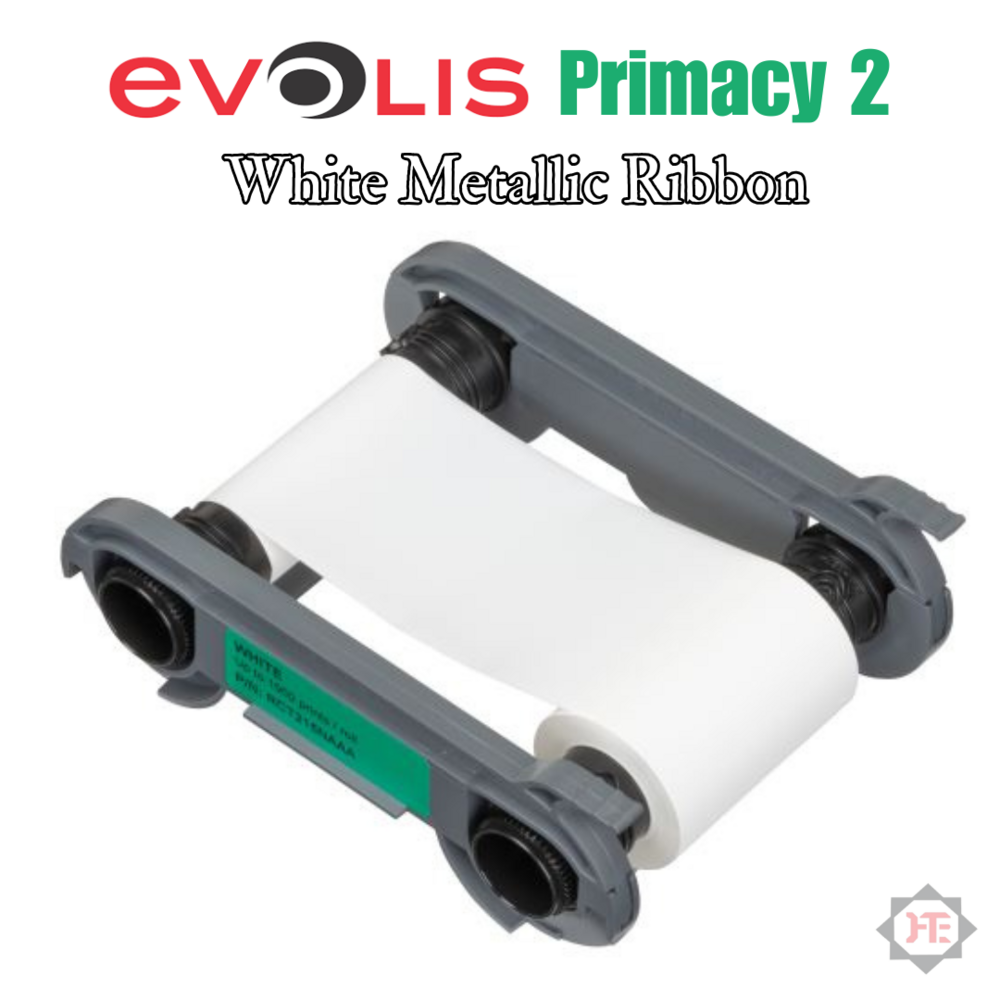
Evolis White Ribbon For Primacy2 ID Card Printer (1000 Prints)
4999 INR/Piece
Product Details:
- Storage Instructions Store in a cool, dry place away from direct sunlight
- Printer Type Primacy2 ID Card Printer
- Capacity 1000 Prints
- Year Built 2023
- Size Standard Ribbon Size
- Weight Approx. 150 g
- Color White
- Click to View more
X
Evolis White Ribbon For Primacy2 ID Card Printer (1000 Prints) Price And Quantity
- 4999 INR/Piece
- 1 Piece
Evolis White Ribbon For Primacy2 ID Card Printer (1000 Prints) Product Specifications
- Store in a cool, dry place away from direct sunlight
- Primacy2 ID Card Printer
- 1000 Prints
- 2023
- Standard Ribbon Size
- Approx. 150 g
- 2-5 Working Days
- White
- Evolis
- Resin (Monochrome) Ink
- White Ribbon for ID Card Printer
- Up to 1000 single-line prints per roll
- Evolis Primacy2 Card Printer
- Solid White
- Silent Operation
- Thermal Transfer
- RCT023NAA
- High print durability, Easy installation, Consistent print quality
- Ideal for printing text, barcodes, and monochrome images on ID cards
- Up to 1 year from production date when properly stored
- 15C to 30C
- PVC Cards and Composite Cards
- Up to 110 meters
- Specifically designed for Evolis Primacy2
Product Description
Evolis White Ribbon For Primacy2 ID Card Printer (1000 Prints)
Make: Evolis
Part Name: White Ribbon
Part Number: RCT216NAAA
Compatible Models: Primacy2
Yield: 1000 Prints
Box Dimensions (LxWxH): 7.2 x 5.1 x 2.4
Consistent, High-Quality Monochrome Prints
This Evolis white resin ribbon produces crisp, durable monochrome images, text, and barcodes on PVC and composite cards. Suitable for professional environments, it ensures each card delivers a strong visual impact with solid white results. The thermal transfer process maintains consistent quality across 1,000 prints, making it ideal for high-volume ID card requirements.
Easy Integration for Evolis Primacy2 Printers
Purpose-built for the Evolis Primacy2 ID Card Printer, this ribbon guarantees seamless installation and optimal performance. Users benefit from hassle-free set-up and reliable compatibility, which reduces downtime and supports efficient workflow in office, campus, or institutional settings.
Reliable and Durable Performance
Designed for durability, this white ribbon ensures that your prints are resistant to everyday wear and fading. With a shelf life of up to a year when stored correctly, you can trust it to deliver consistent results batch after batch. Its solid white pattern and silent operation make it a dependable choice for businesses and organizations alike.
FAQ's of Evolis White Ribbon For Primacy2 ID Card Printer (1000 Prints):
Q: How do I install the Evolis White Ribbon in my Primacy2 ID Card Printer?
A: To install the Evolis White Ribbon, simply open the printer's front cover, remove any old ribbon, and insert the new ribbon in the correct orientation. The Primacy2 is designed for easy ribbon loading, and the printer's on-screen instructions will guide you through the process.Q: What types of cards can the Evolis White Ribbon print on?
A: This ribbon is compatible with both PVC cards and composite cards, making it versatile for various ID, membership, and access card applications where white monochrome printing is required.Q: When should I replace the white ribbon in my printer?
A: You should replace the ribbon once you have reached its capacity of 1,000 prints or when the printer indicates that the ribbon is depleted. Using a fresh ribbon ensures optimal print quality and printer performance.Q: Where should I store my unused Evolis White Ribbon for optimal shelf life?
A: Store your unused ribbon in a cool, dry location, away from direct sunlight. Proper storage ensures the ribbon remains effective and maintains print quality for up to one year from its production date.Q: What are the primary benefits of using the Evolis White Ribbon for Primacy2?
A: The ribbon offers high print durability, consistent print quality, silent operation, and easy installation. It is ideal for high-volume printing and produces sharp, solid white text, barcodes, and monochrome images.Q: What kind of printing technology does this ribbon utilize?
A: The Evolis White Ribbon uses thermal transfer technology with resin-based monochrome ink, delivering vivid, long-lasting prints with every card.Q: Can I use this ribbon in any other Evolis printers besides Primacy2?
A: No, this ribbon is specifically designed for use with the Evolis Primacy2 ID Card Printer. Using it in other models is not recommended and may affect print quality or damage the printer.Tell us about your requirement

Price:
Quantity
Select Unit
- 50
- 100
- 200
- 250
- 500
- 1000+
Additional detail
Mobile number
Email

Other Products in 'Toner Cartridges' category

We mainly handle local order inquiries.
 Send Inquiry


Our Products



A-803, KeyTech Park, Oshiwara. S. V. Road, Jogeshwari West,Mumbai - 400102, Maharashtra, India

Mr Sachin Gavali
(CEO)
Mobile :07971671080
 Send Inquiry
 Send SMS
Developed and Managed by Infocom Network Private Limited.


